Introduction
This guide explains how to clean and maintain a vibration plate so that it continues to deliver reliable full‑body workouts, lymphatic drainage, and muscle activation. Regular upkeep prevents dust buildup, protects electronic components, and extends the machine’s lifespan. Readers will learn the essential tools, a clear step‑by‑step routine, troubleshooting tips, and professional advice for optimal performance.
What You’ll Need
- Soft, lint‑free microfiber cloths
- Mild all‑purpose cleaner or diluted isopropyl alcohol (70% solution)
- Compressed‑air can (optional for crevices)
- Vacuum cleaner with brush attachment
- Non‑abrasive sponge
- Drying towel
- Optional: LifePro Waver Vibration Plate – its included resistance bands can help reach tight corners when cleaning the platform.
Step 1: Power Down and Unplug
Before any cleaning activity, disconnect the plate from the power outlet. This eliminates the risk of electric shock and prevents the motor from inadvertently starting. If your model includes a remote control, such as the AXV Bluetooth Vibration Plate, store the remote in a safe place away from moisture. The remote’s battery compartment is sealed, but exposure to liquids can cause corrosion.
Step 2: Remove Loose Debris
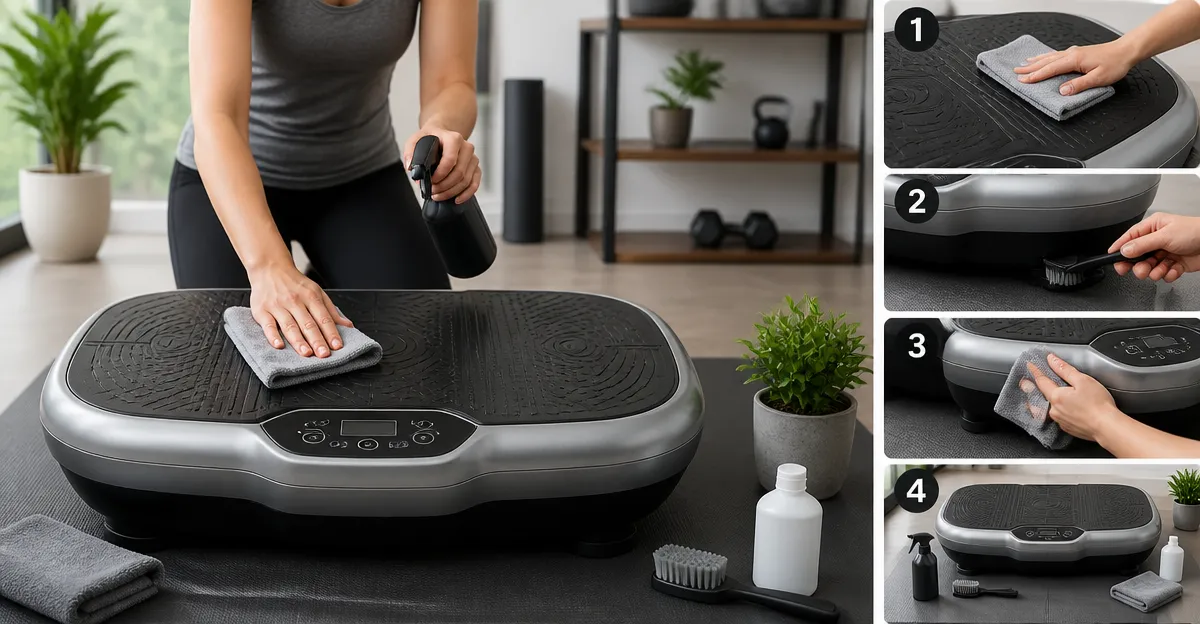
Use a handheld vacuum with a soft brush attachment to remove dust, hair, and loose particles from the surface and the edges of the plate. For larger spaces, a portable vacuum works well. This step prevents grit from scratching the anti‑slip rubber surface during later cleaning. If you own the GLYLF Vibration Plate, its built‑in suction cups provide extra stability, making it easier to move the unit for thorough vacuuming.
Step 3: Clean the Platform Surface
Mix a few drops of mild cleaner with warm water. Dampen a microfiber cloth—do not soak it—and gently wipe the entire platform. The anti‑slip rubber on the LifePro Waver Vibration Plate is resistant to most cleaners, and its 99 speed settings mean the surface is designed for frequent use. Avoid abrasive pads, which could damage the texture. After wiping, use a dry towel to remove excess moisture.
Step 4: Clean the Control Panel and Remote
The digital display and buttons should be cleaned with a lightly dampened cloth. For stubborn fingerprints, apply a small amount of isopropyl alcohol to the cloth, not directly to the device. The SoftGym Vibration Plate features a clear LED display; a gentle approach ensures the screen remains clear and responsive. Allow the panel to air‑dry before powering the unit back on.
Step 5: Maintain the Vibration Mechanism
Periodically inspect the motor housing and the base for dust accumulation. Use compressed air to blow out any particles that have settled near the motor vents. This prevents overheating and maintains the whisper‑quiet operation praised in the LifePro Waver (rated 4.6/5 from over 30,000 reviews). If you notice unusual noises, tighten any loose screws according to the user manual.
Step 6: Lubricate Moving Parts (If Required)
Most consumer vibration plates are sealed and do not require user lubrication. However, if the manufacturer specifies occasional lubrication for the pivot points, apply a few drops of silicone‑based lubricant to the designated areas. The AXV Bluetooth Vibration Plate includes a maintenance guide recommending silicone spray for the adjustable foot‑rest hinges. Follow the guide precisely to avoid excess lubricant.
Step 7: Store Properly
When the plate is not in use, store it in a dry, temperature‑controlled environment. The compact dimensions of the Pofart Vibration Plate (priced at $45.99 and rated 4.4/5) allow it to be placed under a bed or in a closet without risk of damage. Ensure the suction cups are clean and firmly attached to prevent slipping if the unit is moved.
Tips & Pro Tips
- Clean after every 5‑10 sessions to prevent sweat buildup, which can degrade the anti‑slip surface over time.
- Use the resistance bands that come with many models (e.g., the LifePro Waver includes 2 loop bands and 4 resistance bands) to pull the plate gently toward you while cleaning hard‑to‑reach edges.
- Perform a quick visual inspection of the power cord for fraying before each use.
- When using Bluetooth‑enabled plates, such as the GLYLF Vibration Plate, keep the firmware updated via the companion app to maintain optimal performance.
- For households with pets, place a protective mat beneath the plate to catch hair and reduce cleaning frequency.
Troubleshooting
| Problem | Possible Cause | Solution |
|---|---|---|
| Plate vibrates unevenly | Uneven floor surface or loose suction cups | Adjust the suction cups, place a rubber mat, and ensure the plate is level. |
| Display flickers | Moisture in the control panel | Power off, dry the panel with a soft cloth, and avoid cleaning liquids near the display. |
| Unusual motor noise | Dust in motor vents | Use compressed air to clear vents; repeat monthly. |
Conclusion
By following this comprehensive cleaning and maintenance routine, users can preserve the performance, safety, and aesthetic appeal of their vibration plates. Regular care reduces wear, supports accurate speed settings, and ensures that the device continues to deliver the full‑body benefits advertised by manufacturers. Implement these steps after each workout, and your plate will remain a reliable fitness companion for years to come.
Products Mentioned in This Guide
Frequently Asked Questions
How often should I clean my vibration plate?
Clean the surface after each use and perform a deeper cleaning weekly to prevent dust buildup.
What cleaning solutions are safe for the plate’s electronics?
Use a mild all‑purpose cleaner or a 70% isopropyl alcohol solution applied to a microfiber cloth; never spray liquids directly on the unit.
Can I use water or steam to clean the vibration plate?
Avoid direct water or steam, as moisture can damage internal components; stick to lightly dampened cloths.
How do I reach tight corners and crevices on the platform?
Use a non‑abrasive sponge, a soft brush, or resistance bands (like those on the LifePro Waver) to pull dirt out, and optionally a compressed‑air can for dust.
What routine maintenance extends the plate’s lifespan?
Power down and unplug before cleaning, regularly vacuum the base, check for loose bolts, and keep the unit in a dry, dust‑free environment.